
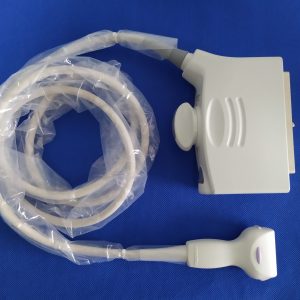
Siemens Acuson S1000 replacement routes may include independently supplied compatible probes, refurbished OEM transducers, or evaluation of the existing probe. The table below preserves the S-Series model shortlist already associated with this page. A third-party compatible probe is not represented as manufactured or endorsed by Siemens. Confirm the exact model, part number, connector, software configuration, price, and current availability before ordering.
Siemens Acuson S1000 Compatible Probe List
The table covers S-Series probes associated with the S1000, S2000, and S3000 families. Shared naming does not replace a unit-level compatibility check: use the model and application as a shortlist, then match the connector part number, system serial information, and software configuration for the target S1000 before purchase.
| Model | Type | Primary applications | Frequency range |
|---|---|---|---|
| 4C1 | Convex | General abdominal, OB/GYN, renal | 1.5–4.5 MHz |
| 6C1 HD | Convex | Abdominal, liver elastography, OB | 1.5–6 MHz |
| EV-8C4 | Endocavity | Transvaginal OB/GYN | 4–8 MHz |
| EC9-4 (S-Series) | Endocavity | Transvaginal and transrectal imaging | 4–9 MHz |
| MC9-4 | Micro-convex | Pediatric abdominal, neonatal head | 4–9 MHz |
| 9L4 | Linear | Vascular, thyroid, small parts | 4–9 MHz |
| 14L5 | Linear | Breast, musculoskeletal, small parts | 5–14 MHz |
| 14L5 SP | Linear (compact) | Intraoperative, vascular access | 5–14 MHz |
| 18L6 HD | Linear | High-resolution breast, MSK, superficial vascular | 5.5–18 MHz |
| 4V1 | Phased array | Adult cardiac, transcranial | 1–4 MHz |
| 8V3 | Phased array | Pediatric cardiac | 3–8 MHz |
| 10V4 | Phased array | Neonatal cardiac and head | 4–10 MHz |
| V5Ms | TEE | Multiplane transesophageal echo | Multiplane TEE |
Additional S-Series options may exist for specialty work, including laparoscopic and CW pencil probes. The Siemens Acuson probe catalog can be used to review listed models, but current availability and S1000 fit must be confirmed for the exact unit before an order is placed.
The S1000 Is Discontinued: What That Means for Probe Sourcing
The S1000 is a legacy S-Series platform. Depending on the region and part number, buyers may encounter remaining OEM channels, refurbished OEM units, and third-party compatible alternatives. Treat every offer as unit-specific and request written identification and commercial terms.
Do not assume that one sourcing route is automatically cheaper or available. Compare quotations for the exact model and condition, including what is supplied, the return terms, inspection scope, and dispatch estimate. Compatible aftermarket probes must be described as independent products rather than OEM parts.
Ask the supplier what inspection was actually performed and request the available simple inspection report. Its methods and limitations should be stated clearly; it must not be presented as a detailed crystal assessment, regulatory certificate, or guarantee that the probe will remain serviceable. The buyer remains responsible for the facility checks applicable to endocavity and TEE devices.
Repair or Replace an S1000 Probe?
Not every failed transducer requires the same remedy. Request a documented evaluation from the probe repair service and compare its written scope and quotation with replacement options. Cost, feasibility, and turnaround depend on the individual probe and failure mode.
- Repair is usually economical for: cable cuts and connector damage, lens (acoustic window) wear or delamination, damaged strain reliefs, and housing cracks. These are the most common failures on heavily used 4C1 and 9L4 probes and do not involve the array itself.
- Further evaluation may be appropriate for: intermittent image artifacts or suspected moisture exposure, provided the facility removes the probe from clinical use until a qualified assessment is completed.
- Replacement is normally the better call for: large dead zones in the image, a dropped probe with internal array damage, or TEE probes with bite-through and articulation failure where repair cost approaches replacement cost.
If image quality has degraded, request an inspection first and ask for the methods and findings in writing. The decision should follow the documented scope and quotation rather than an assumed test result or repair outcome.
How to Order the Right Probe
Send the exact system model, software version, probe model, connector part number, connector photo, and intended application. Ask the quotation to state compatibility, actual availability, inspection scope, the simple report supplied, commercial terms, and dispatch timing. For endocavity and TEE use, verify the facility safety and reprocessing requirements separately. Plan backup coverage internally before sending a probe for evaluation.
Siemens Acuson S1000 probes: current evidence update
Answer first: A Siemens Acuson S1000 probes request should preserve the complete probe and host-system labels, connector photographs, supply path, current condition, item-specific photos, named test scope and written compatibility basis. A catalogue record is a shortlist; it does not prove the condition or support of every revision.
| Field | Evidence | Control |
|---|---|---|
| Probe identity | Brand, full model, suffix and label | Keep this field tied to the exact Siemens Acuson S1000 probes request. |
| Host system | Console model and configuration context | Keep this field tied to the exact Siemens Acuson S1000 probes request. |
| Connector | Contact face, housing, latch and cable entry | Keep this field tied to the exact Siemens Acuson S1000 probes request. |
| Offer type | OEM-brand, compatible, used, refurbished or repair | Keep this field tied to the exact Siemens Acuson S1000 probes request. |
| Condition | Current lens, housing, cable and connector photos | Keep this field tied to the exact Siemens Acuson S1000 probes request. |
| Test evidence | Named checks, conditions, result format and exclusions | Keep this field tied to the exact Siemens Acuson S1000 probes request. |
Why this page is different from a product listing
The article explains how to evaluate the request and routes readers to current catalogue records. A product or category page owns the commercial inventory intent. This article should not compete by repeating a long list of unverified models; it adds decision evidence, limitations and an RFQ workflow that a product card cannot provide.
Model and configuration boundaries
For repair, describe what appears, when it appears and whether movement changes the symptom; do not assign an internal cause remotely. For purchase, ask the quotation to identify the offered item, current condition and availability at the time of the request.
Keep general documentation separate from item-level proof. A source can explain terminology or testing boundaries, while the physical label, current photos, inspection record and quotation establish facts about the exact item. Mark unresolved fields pending instead of copying a specification or compatibility statement from a similar model.
Four-step review
- Capture complete labels and all relevant physical interfaces.
- Check the exact current document or written match basis.
- Separate catalogue discovery from item condition and test evidence.
- Approve only a quotation that repeats the identity, scope, exclusions and terms.
Related catalogue and service links
Frequently asked questions
Does the model phrase alone prove the correct Siemens Acuson S1000 probes?
No. Verify the complete labels, physical interface and current configuration-specific evidence.
Can a catalogue image prove condition?
No. Request current photos tied to the quoted item or service record.
What should the written quote identify?
Exact identity, compatibility basis, condition, evidence, included items, availability basis, shipping responsibility and remedy terms.
Sources
Evidence update checked 3 August 2026. Use current exact documentation for the device and jurisdiction involved.