
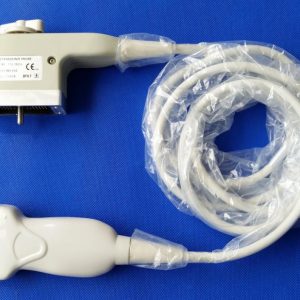
Answer first: Akicare's current Kontron manufacturer archive contains one published CA531K probe record. That does not establish a complete IMAGIC Maestro compatibility list. A Maestro request should preserve the full console label and configuration, identify the proposed probe and connector, and keep the match pending until the specific written evidence supports it.
Kontron Imagic Maestro Probes: evidence matrix
| Decision field | Evidence to collect | Why it matters |
|---|---|---|
| Current catalogue record | CA531K | One live record is not a universal Maestro list |
| Console identity | Complete IMAGIC Maestro label and configuration | Separates the host request from a broad brand name |
| Probe identity | Full model, suffix and part number | Prevents a shortened model from hiding a variant |
| Connector | All faces, latch and cable-entry photos | Supports comparison without proving fit |
| Compatibility basis | Current documentation or quote-specific written basis | Makes the claimed match reviewable |
| Condition | Dated item-specific photos | Separates the offer from catalogue imagery |
| Commercial scope | Availability, included item, testing and terms | Turns discovery into an auditable quote |
A current archive is not a complete manufacturer database
The site currently publishes CA531K under Kontron. It would be misleading to inflate that into a list of all probes ever associated with IMAGIC Maestro. This page therefore states the current evidence and gives a route for an unlisted model request rather than fabricating extra compatibility.
Capture the console context first
Photograph the complete system label and record any relevant hardware or software context available to the equipment owner. Then capture the proposed or existing probe label and connector. Similar connector shells or marketplace phrases do not establish electrical or software support.
Ask what compatible means
The quotation should say whether the offer is OEM-brand, third-party compatible, used, refurbished or repair service. It should also identify the evidence used for the proposed pairing and any fields that remain pending.
Use repair evidence when the physical unit already exists
For an existing probe, record the symptom, trigger, physical condition and host system. Request a defined inspection and verification scope instead of replacing the unit solely because a generic article lacks a model entry.
Verification workflow
- Check the Kontron archive: Use CA531K only when that is the requested record.
- Capture console and probe labels: Preserve every model character and connector view.
- Request written basis: Ask how the exact pairing was determined.
- Keep gaps pending: Do not turn an unlisted model into a compatibility claim.
How to keep the decision auditable
Use one reference across the enquiry, photographs, source documents, quotation and later inspection or acceptance record. Save the date and origin of each fact. When the model, system, condition, quantity or service scope changes, create a new revision rather than silently reusing evidence from another item. Mark unresolved fields as pending; a missing answer should not be converted into a positive compatibility, condition or availability claim.
Before approval, have a second reviewer compare the complete model characters, connector, host-system context and quotation scope. This catches mixed photo sets, copied specifications and broad catalogue statements that do not belong to the physical item. The written quote is the final commercial control point and should identify the exact offer, evidence, exclusions, availability basis, shipping responsibility and remedy terms.
Evidence that belongs to the exact item
Keep general source material separate from item-level proof. A manufacturer page or technical reference can explain terminology and decision boundaries. A catalogue page can show that Akicare currently has a related record. Neither one proves the serial identity, present condition, stock position or test result of a unit offered today. Those facts require photographs, labels, inspection records or quotation statements tied to the same item reference. This separation is especially important when a page uses representative imagery or when a model name appears across several systems.
Questions to resolve before commitment
Ask whether every specification comes from the exact model document, whether the connector and host-system configuration were checked, whether photographs show the offered unit, and whether the test statement names its method and exclusions. Also confirm what is included, what remains pending, when availability was checked, who carries shipping responsibility and what remedy applies if the received identity or condition differs from the written record. These questions turn a broad search result into a reviewable B2B purchasing or service decision.
Record negative findings as carefully as positive ones. If a source does not establish a model pairing, if a photograph is representative, or if a test excludes part of the device, say so beside the affected field. Clear limitations help the next reviewer act; vague confidence only hides the remaining work.
Open the relevant Akicare catalogue or assessment
Frequently asked questions
Which Kontron record is currently published?
The current manufacturer archive contains CA531K.
Does this prove CA531K fits every Maestro configuration?
No. Confirm the full console context, connector and written compatibility basis.
What if my model is not listed?
Send complete labels and connector photos for an evidence-based RFQ; keep the match pending.
Can visual similarity replace documentation?
No. It is only an identification clue.
Related Akicare resources
Sources and evidence boundary
- Akicare Kontron archive
- AIUM transducer testing and repair statement
- Akicare supplier evidence checklist
Sources checked 3 August 2026. Use the current exact manufacturer document, facility procedure and jurisdiction-specific requirement for the device involved.