
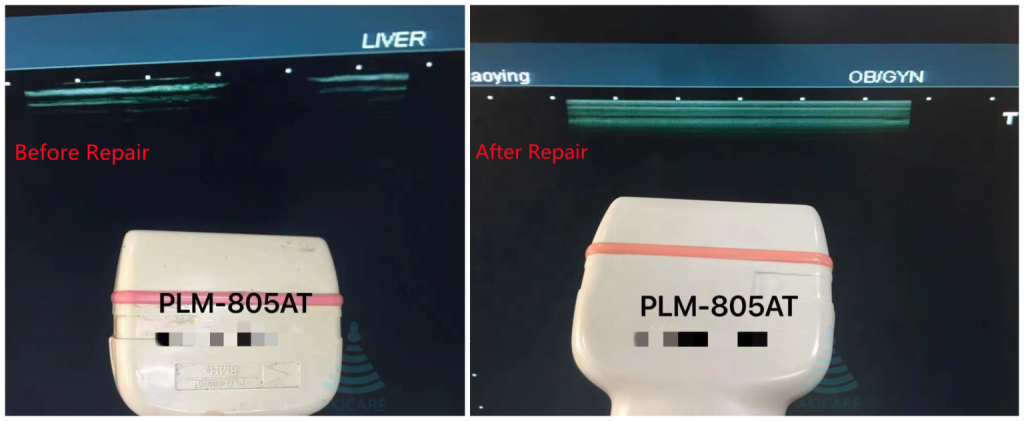
Answer first: For Toshiba and Canon-labelled probe requests, preserve the brand exactly as it appears on the physical label, then record the model, connector and host system. A combined browse family can simplify navigation, but it must not erase the original label identity or create a blanket compatibility claim.
Editorial scope: This is a procurement and service-evidence guide. It does not replace the exact manufacturer’s instructions for use, a clinical procedure, a physical inspection, the equipment owner’s safety process or a quote-specific compatibility decision.
Evidence basis and limits
AIUM's official statement says regular assessment of transducer operation and quality control of repaired transducers are critical. The cited sources support the inspection and evidence boundaries used here; they do not prove the condition of an item that has not been inspected.
Toshiba Ultrasound Probe Repair: decision matrix
| Decision field | Evidence to collect | Why it matters |
|---|---|---|
| Label brand | Exact text and logo on the probe | Preserves the physical identity |
| Model | Full model including suffixes | Avoids collapsing variants |
| Connector | Face and housing photos | Separates connection families |
| Host system | Brand, model and software | Creates a configuration-specific request |
| Archive family | Canon/Toshiba browse tag | Supports discovery without changing source identity |
| Symptom | Observed behavior and trigger | Keeps repair intake separate from compatibility |
| Source reference | Catalogue or OEM record URL | Makes every mapping reviewable |
Navigation labels and product identities serve different jobs
The site combines Canon and Toshiba in a browse family so buyers can find related records. Product attributes and RFQ evidence still retain the label brand. That design avoids duplicate category clutter without rewriting the probe.
Treat suffixes as meaningful until verified
Do not remove a suffix because another catalogue page uses a shorter model. Capture the full label and connector first, then compare source records.
Repair scope does not prove system compatibility
A provider may be able to inspect a probe without asserting that every system in a family supports it. Keep those conclusions separate in the quote.
A practical verification workflow
- Identify the item. Photograph the complete label, serial or internal reference, connector and full device. Use the same reference in filenames, the RFQ and shipping record.
- Record the request. State the host system, software context when relevant, intended product or service path and the observed symptom or purchasing need in plain language.
- Collect comparable evidence. Ask every provider for the same rows in the decision matrix. Keep representative catalogue imagery separate from photos of the offered or serviced unit.
- Resolve gaps before commitment. Leave unknown fields marked pending. A short model stem, broad category, logo, database hit or verbal assurance should not replace exact item evidence.
- Confirm the written boundary. The quotation or service record should state compatibility assumptions, condition, inspection or test scope, exclusions, availability, timing, shipping responsibility and remedy terms for that request.
Common evidence failures to avoid
- Label brand: leaving this undocumented weakens the record because it preserves the physical identity.
- Model: leaving this undocumented weakens the record because it avoids collapsing variants.
- Connector: leaving this undocumented weakens the record because it separates connection families.
- Host system: leaving this undocumented weakens the record because it creates a configuration-specific request.
- Archive family: leaving this undocumented weakens the record because it supports discovery without changing source identity.
How to compare the final record
Read the evidence in three layers. The catalogue layer helps discover a possible model. The item layer connects photos, labels, condition and test records to one physical device. The commercial layer states what will be supplied or serviced and under which terms. A strong answer in one layer cannot fill a gap in another. For example, a correct catalogue match does not establish current stock, and a dated photo does not establish system compatibility.
Before approval, ask a second reviewer to check the exact model characters, connector family, host-system context and every unresolved field. This simple review catches copied model stems, mixed photo sets and scope assumptions that keyword matching alone cannot detect.
Keep an audit-ready decision record
Save the original-resolution photos, source links, document revisions, quotation and later inspection or acceptance record under the same item reference. Record who supplied each fact and the date it was checked. If a model, system, quantity, destination or service scope changes, open a new revision instead of silently overwriting the earlier answer. This preserves the reason behind the decision and prevents evidence collected for one configuration from being reused as a universal claim.
The final record should also identify what was not checked. Clear exclusions are useful: they show where an owner, manufacturer, qualified service provider or facility procedure must supply the next decision. An honest pending field is safer and more actionable than a polished but unsupported conclusion.
Request an ultrasound probe repair assessment
Frequently asked questions
Why combine Canon and Toshiba in navigation?
It reduces browse fragmentation while preserving the exact label brand on product and RFQ records.
Can two probes with the same model stem use the same connector?
Do not assume so. Verify the full label and connector photographs.
Does a repair quote confirm compatibility?
Only when the quote explicitly includes and supports that verification scope.
Related evidence guides
- How to Identify an Ultrasound Probe Connector From Photos Without Guessing Compatibility
- Aloka and Hitachi Aloka Probe Repair: How to Verify Brand, Model and Host System
Sources and scope
- Akicare Canon/Toshiba catalogue
- AIUM transducer testing and repair statement
- BMUS multicentre probe condition survey
Sources checked 3 August 2026. Use the current exact manufacturer document, facility procedure and jurisdiction-specific requirement for the device involved.
{“@context”:”https://schema.org”,”@type”:”FAQPage”,”mainEntity”:[{“@type”:”Question”,”name”:”Why combine Canon and Toshiba in navigation?”,”acceptedAnswer”:{“@type”:”Answer”,”text”:”It reduces browse fragmentation while preserving the exact label brand on product and RFQ records.”}},{“@type”:”Question”,”name”:”Can two probes with the same model stem use the same connector?”,”acceptedAnswer”:{“@type”:”Answer”,”text”:”Do not assume so. Verify the full label and connector photographs.”}},{“@type”:”Question”,”name”:”Does a repair quote confirm compatibility?”,”acceptedAnswer”:{“@type”:”Answer”,”text”:”Only when the quote explicitly includes and supports that verification scope.”}}]}