
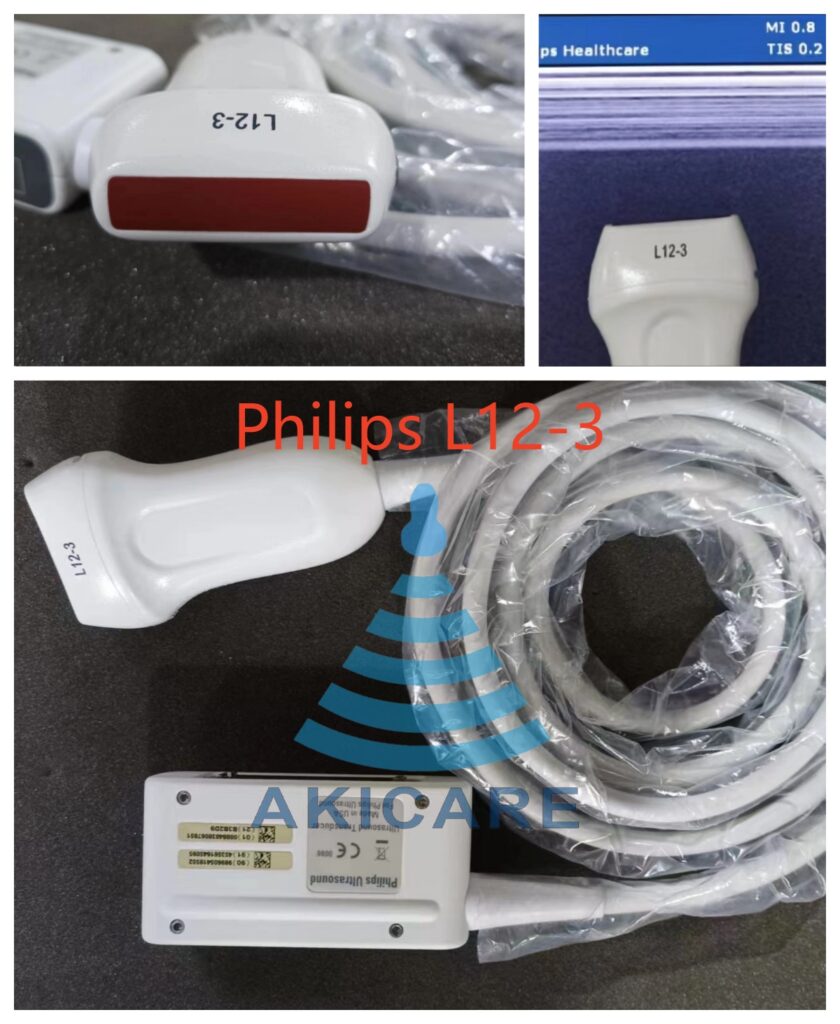
Answer first: To find the right Philips L12-3 ultrasound probe, work from the complete physical label, the connector, the host-system model and the software context—not from the short “L12-3” model stem alone. Before buying, compare exact identity, offer type, current photos, condition, test scope and written remedy terms. For repair, add the observed fault and handling history. A catalogue listing helps discovery; only item-level evidence and a written quotation confirm a match.
Editorial scope: This is a procurement and service-evidence guide. It does not replace the manufacturer’s instructions for use, a clinical procedure, a physical inspection, the equipment owner’s safety process or a quote-specific compatibility decision.
Why the complete identifier matters
A short model stem can appear across different product records, connector families or system generations. The L12-3 label exists in more than one physical variant—for example, catalogue records distinguish a standard L12-3 linear probe, an L12-3 Ergo variant and a part-number-identified L12-3 (21475A). Preserve every character on the connector or label and send a readable photograph. Do not assume that an Ergo, part-number or regional variation is interchangeable unless current manufacturer documentation and the exact quotation support that conclusion. A connector photo or a similar model name does not prove fit.
Philips L12-3 ultrasound probe: decision matrix
| Decision field | Evidence to collect | Why it matters |
|---|---|---|
| Full label | Brand, complete model, part number and serial/reference photo | Separates the exact variant from a short model stem |
| Connector | Contact face, housing, latch and cable-entry photos | Confirms the connection family without guessing fit |
| Host system | Console model and software context | Keeps compatibility specific to one configuration |
| Offer type | OEM-brand, compatible, used, refurbished or repair | Prevents unlike supply paths being compared as one item |
| Current condition | Dated lens, housing, cable and connector photos | Creates an item-specific baseline |
| Test scope | Named checks, conditions, result format and exclusions | Replaces an undefined “tested” claim with a boundary |
| Repair symptom | Observed sign, trigger and on-screen evidence | Supports intake without assigning an internal cause |
| Commercial scope | Availability basis, timing, shipping responsibility and remedy terms | Separates a catalogue page from a written quote |
Catalogue discovery versus item-specific evidence
Read the evidence in three layers. The catalogue layer helps you discover a possible model—for example, the Philips L12-3 (21475A) Linear Ultrasound Probe and the Philips L12-3 Ergo Linear Ultrasound Probe listings show one model stem covering distinct items. The item layer connects photos, labels, condition and test records to one physical device. The commercial layer states what will be supplied or serviced and under which terms. A strong answer in one layer cannot fill a gap in another: a correct catalogue match does not establish availability, and a dated photo does not establish system compatibility. Confirm the exact variant and condition in writing before committing.
Compare buying and repair as different evidence paths
A purchase record should identify the offered unit or supply type, its current condition and the evidence included with the offer. A repair record should identify the physical unit, the reported symptom, the incoming inspection and the proposed work. Put both options in one comparison only after the rows describe the same device and the same acceptance boundary. If repair is on the table, the probe repair service page describes the service route, and the Philips probe repair model and connector checklist helps you prepare the intake evidence a repair partner will ask for.
What a useful test statement contains
Ask which visual, electrical, acoustic, imaging or system checks are included, under what conditions, and what result will be delivered in writing. AIUM’s official statement on transducer testing and repair emphasizes regular transducer assessment and quality control of repaired transducers; a generic pass label does not explain the test boundary. The BMUS multicentre probe-condition survey found that a meaningful share of probes in clinical use showed defects, so a dated, item-specific inspection matters more than a category-level assurance. For cleaning and reprocessing context between examinations, the CDC guidance on disinfection and sterilization of healthcare equipment defines the framework your facility’s own process should follow.
A practical verification workflow
- Identify the item. Photograph the complete label, serial or internal reference, connector and full device. Use the same reference in filenames, the RFQ and the shipping record.
- Record the request. State the host system, the software context when relevant, the intended product or service path and the observed symptom or purchasing need in plain language.
- Collect comparable evidence. Ask every provider for the same rows in the decision matrix. Keep representative catalogue imagery separate from photos of the offered or serviced unit.
- Resolve gaps before commitment. Leave unknown fields marked pending. A short model stem, a broad category, a logo, a database hit or a verbal assurance should not replace exact item evidence.
- Confirm the written boundary. The quotation or service record should state compatibility assumptions, condition, inspection or test scope, exclusions, availability basis, timing, shipping responsibility and remedy terms for that specific request.
Common mistakes to avoid
- Searching by model stem only. “L12-3” returns multiple variants; match the complete label and part number instead.
- Treating a connector photo as proof of fit. It confirms a connection family, not host-system compatibility—use a structured connector photo identification process and written confirmation.
- Comparing unlike offers. A used probe, a refurbished probe and a repair quote are different supply paths; align the acceptance boundary first.
- Accepting undefined test claims. Ask for named checks, conditions and the delivered result format.
- Skipping the second review. Before approval, ask a colleague to check the exact model characters, connector family, host-system context and every unresolved field.
Keep an audit-ready decision record
Save the original-resolution photos, source links, document revisions, the quotation and the later inspection or service outcome in one record tied to the item’s serial or reference number. A structured supplier evidence evaluation approach makes the record reusable when the next probe purchase or repair decision comes up, and gives quality and procurement reviewers one shared evidence set.
Commercial next step
If your evidence points to a purchase, review the Philips L12-3 (21475A) Linear Ultrasound Probe listing or browse the full probe catalogue, then request a written quote that names the exact variant, condition and test scope. If your evidence points to repair, start from the repair service page with your symptom record and photos ready.
Frequently asked questions
Is the Philips L12-3 compatible with my ultrasound system?
Do not assume compatibility from the model name alone. Provide the console model and software context with photos of the probe label and connector, and ask the supplier to confirm compatibility in writing for that exact configuration before you buy.
Which photos should I send when requesting a Philips L12-3 quote?
Send a readable full label, the serial or reference number, the connector face and latch, the lens, the housing and the cable along its full length. Use the same reference in your filenames, RFQ and shipping record so the evidence stays attached to one physical item.
Can I assume a biopsy guide listed for the L12-3 will fit my probe?
No. A guide listing is a catalogue statement, not item-specific proof. The guide record, the probe record, the intended procedure and the reprocessing instructions must all match, and any missing field should be confirmed in writing before use or purchase.
Should I repair my Philips L12-3 or buy a replacement?
Compare the two paths only after both describe the same device. A repair decision needs the observed symptom, incoming inspection and proposed work scope; a purchase decision needs the offered unit’s condition and test evidence. Choose once the written quotations define scope, exclusions and remedy terms for the same acceptance boundary.
Sources
- AIUM — Transducer Testing and Repair (official statement)
- BMUS multicentre ultrasound probe condition survey
- CDC — Disinfection and Sterilization of Healthcare Equipment