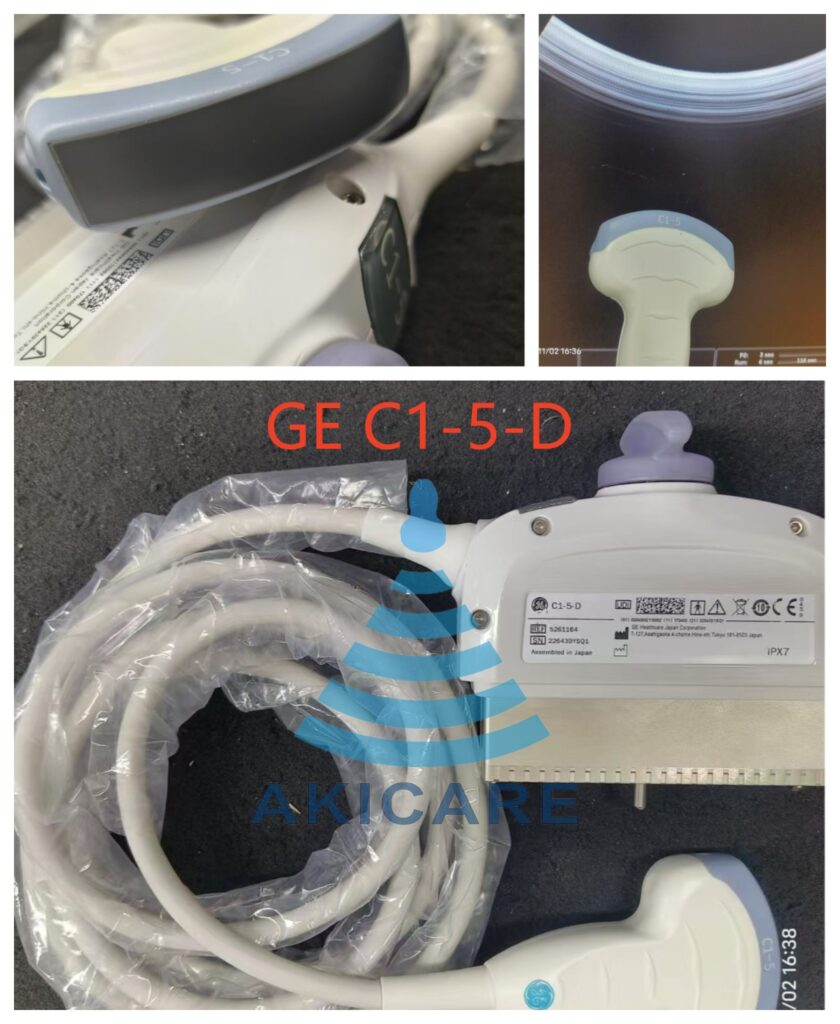
You can find a GE C1-5-D ultrasound probe through three realistic routes: new from GE HealthCare and its dealer network, as a compatible replacement from an independent supplier, or by repairing the C1-5-D your department already owns. The right route depends on your console model, the condition of your existing probe, and the written compatibility evidence a supplier can provide. This guide explains what the C1-5-D is, which GE consoles it is listed for, how to verify compatibility before paying, and how to decide between buying and repairing.
What the GE C1-5-D Is
The C1-5-D is a wideband convex (curved array) transducer built for deep-tissue imaging. Its published characteristics include:
- Array type: convex, 64-element curved array
- Frequency range: approximately 1.5–5.0 MHz
- Imaging modes: B-mode, harmonic imaging, M-mode, and color and spectral Doppler on supported consoles
- Interface: GE “D-type” connector used on current-generation GE consoles
Clinically, it covers abdominal, obstetric, and gynecological examinations where penetration depth is the priority, and it pairs with a dedicated bracket for guided procedures — the GE C1-5-D biopsy needle guide is the matching catalogue item.
Which GE Consoles the C1-5-D Fits
The C1-5-D is associated with GE’s premium console families:
| Platform family | Representative models | What to verify |
|---|---|---|
| LOGIQ series | LOGIQ E9, LOGIQ S8 | Probe appears on the console’s approved transducer list |
| Vivid series | Vivid E9 | Console software option set supports the C1-5-D |
Console support is not determined by the connector alone. A probe may physically seat and still not initialize if the console software does not include it. Before ordering, check your system’s approved transducer list or ask the supplier to confirm in writing against your exact console model and software level. Treat any listing that shows only a connector photo, or a name that is merely similar, as a starting point for questions rather than proof of fit.
Three Sourcing Routes Compared
| Route | What you get | Key questions to ask |
|---|---|---|
| New OEM probe from GE HealthCare | Original manufacturer unit through the dealer channel | Lead time, list price, and whether your service contract requires OEM parts |
| Compatible replacement from an independent supplier | Independently manufactured unit intended for the same consoles | Written compatibility confirmation for your exact console, and what documentation accompanies the probe |
| Repair of your existing C1-5-D | Your own probe returned to service after a laboratory evaluation | Whether the fault is economically repairable and what the evaluation report shows |
Compatible replacements are not OEM parts, and an independent supplier is not affiliated with GE HealthCare; a trustworthy supplier will state this plainly rather than imply endorsement. For the compatible route, the catalogue destination is the GE C1-5-D convex ultrasound probe product page. For repair, a model-specific entry point is the C1-5-D probe repair service for GE Vivid E9, and the general probe repair page explains the evaluation process.
Catalogue Discovery vs. Item-Specific Evidence
A catalogue listing tells you a supplier claims to handle the C1-5-D; it says nothing about the individual unit you would receive. Discovery questions cover whether the model is handled at all. Evidence questions cover the specific item: its documented condition, any inspection or test records, and written confirmation that it is offered for your exact console. If a supplier cannot provide item-specific answers, treat the listing as unverified. Our page on evaluating ultrasound probe supplier evidence sets out the questions, and the probe catalogue is the starting point for discovery.
Step-by-Step Sourcing Workflow
- Identify your console precisely. Record the console model and software version, for example a LOGIQ E9 at a specific software level, from the system information screen.
- Check the approved transducer list. Confirm the C1-5-D appears in your console’s documentation or transducer selection menu as a supported probe.
- Assess your existing probe. Note the fault symptoms: dropout bands, lens wear, cable or connector damage. This determines whether repair is worth evaluating.
- Request written compatibility confirmation. Ask the supplier to state, in writing, that the offered C1-5-D is intended for your named console. Do not accept a connector photo as a substitute.
- Request item documentation. Ask what condition records or test reports accompany the specific unit, and keep whatever is provided with your service files.
- Verify on arrival before clinical use. Confirm the console identifies the probe correctly, run an air scan with gel at raised gain to look for dark banding that suggests element dropout, and compare penetration and Doppler performance against your previous probe on a known subject.
Common Mistakes When Sourcing a C1-5-D
- Assuming connector fit equals compatibility. The D-type connector is shared across GE probes; seating correctly is necessary but not sufficient.
- Confusing the C1-5-D with the C1-5 or C1-5-RS. These are different model strings. A listing or biopsy guide named for one is not evidence about another.
- Skipping the repair option. Lens, cable, and connector faults are frequently repairable, and an evaluation verdict costs little compared with an unnecessary replacement.
- Accepting vague condition language. Words like “good condition” without records are marketing, not evidence.
Care, Testing, and Reprocessing Context
The BMUS multicentre survey of ultrasound probe condition in clinical use found that a meaningful proportion of probes in routine service had faults, many of them physical damage that routine checks could catch early — a practical argument for periodic inspection rather than waiting for image complaints. The AIUM’s official statement on transducer testing and repair describes the scope of professional transducer evaluation and why repairs should be performed by qualified facilities with appropriate test capability.
Biopsy Guide Matching
If you use the C1-5-D for guided procedures, the guide, probe, and procedure documentation must all name the same model. Guides whose titles explicitly include C1-5-D, such as the GE C1-5-D biopsy needle guide or the Akicare disposable guide for GE C1-5-D / C1-5-RS, are catalogue matches for this probe. Guides labelled only for the C1-5, without the -D suffix, are different products and should not be assumed to fit.
Next Step
Send us your GE console model and software level, and whether you need a replacement C1-5-D or an evaluation of your existing probe. We will confirm compatibility in writing before you commit. Start from the GE C1-5-D product page or the GE-compatible probe listing.
Frequently Asked Questions
Which GE systems is the C1-5-D designed for?
The C1-5-D uses GE’s D-type connector and is listed for current-generation GE consoles, including the LOGIQ E9, LOGIQ S8, and Vivid E9 families. Because support depends on console software options, always confirm the probe against your specific system’s approved transducer list before purchasing.
Can a faulty C1-5-D be repaired instead of replaced?
Many common faults, such as lens wear, cable damage, connector problems, and limited element dropout, can often be evaluated for repair. A qualified probe repair laboratory should assess the probe first and report whether a repair is technically sound or whether replacement is the better option.
Does a matching connector photo prove a C1-5-D will work on my console?
No. A connector photo or a similar model name does not prove compatibility. Connector fit is only one requirement; the console must also recognize and support the probe in software. Ask for written compatibility confirmation that names both your exact console model and the C1-5-D before you commit.
Which biopsy needle guide fits the GE C1-5-D?
Guides sold for the C1-5-D include a dedicated GE C1-5-D biopsy needle guide and third-party guides whose titles explicitly name the C1-5-D. Guides labelled only for the C1-5 or C1-5-RS are different products; match the guide, probe, and procedure documentation before ordering.
Sources
- AIUM Official Statement: Transducer Testing and Repair — scope of professional transducer evaluation and repair.
- CDC: Disinfection and Sterilization of Healthcare Equipment — device classification and disinfection levels.
- BMUS multicentre survey of ultrasound probe condition — prevalence and types of probe faults found in clinical service.